Serverless Data Pipeline: 100GB Financial Data, $3.50/Mo
Most data engineering teams default to provisioned infrastructure: a VM running cron jobs, a Kubernetes cluster with Airflow, or a managed ETL service with a four-figure monthly bill. For a financial data collection system that runs a few times per day and processes data in bursts, that is a waste of money.
We built a serverless data pipeline on Azure Functions that collects stock prices, cryptocurrency rates, forex pairs, financial reports, and macroeconomic indicators. It stores everything in Azure Blob Storage as CSV files. After 18 months of continuous operation, the system holds over 100GB of financial data. The Azure bill averages $3.50 per month.
This article breaks down the architecture, the tradeoffs we made, and the cost math that makes serverless the right choice for this workload.
Architecture: Azure Functions as the Orchestration Layer
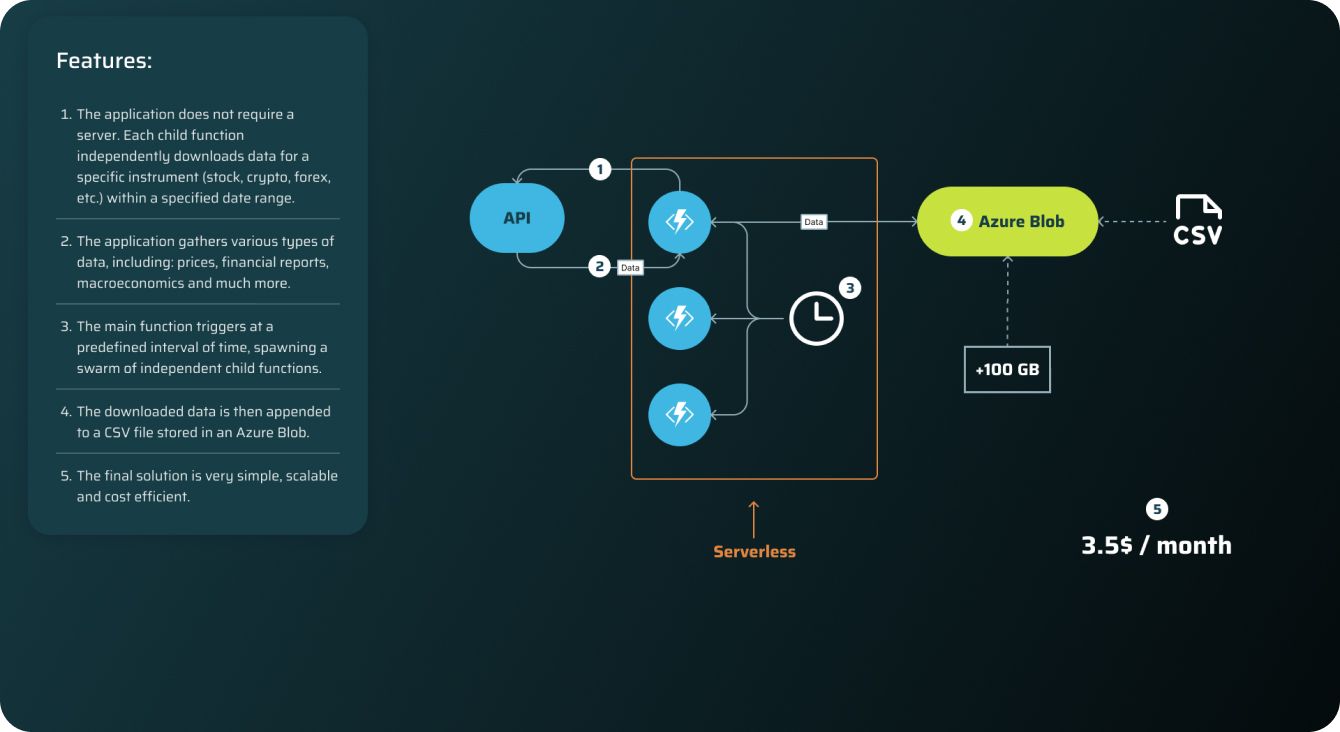
The system uses a two-tier function architecture: one orchestrator and many workers.
The orchestrator function fires on a timer trigger. When it wakes up, it reads the most recent update timestamps from Azure Blob Storage. For each financial instrument, it checks the last collected date. If there is a gap between that date and today, the orchestrator spawns a child function with the instrument identifier and the missing date range as parameters.
The child functions each handle one instrument and one date range. They call the relevant API, normalize the response, and append the result to the appropriate CSV file in Blob Storage. Each child function is stateless. It reads nothing except its input parameters and the API response.
This fan-out pattern means the orchestrator does almost no compute work. It reads metadata, calculates date gaps, and dispatches. The actual data collection happens in parallel across as many child functions as needed.
Why Azure Functions instead of alternatives:
- vs. AWS Lambda: Azure Functions Consumption Plan bills per execution with a generous free tier (1 million executions/month free). For a workload that runs a few hundred functions per day, the compute cost rounds to zero. Lambda would work technically, but Azure Blob Storage is cheaper than S3 for append-heavy workloads at this scale, and the Durable Functions extension provides built-in orchestration patterns without bolting on Step Functions.
- vs. Kubernetes/Airflow: A single-node AKS cluster costs ~$70/month before you add storage. Airflow on Kubernetes adds operational overhead: DAG management, worker scaling, metadata database, webserver. For a pipeline with one pattern (fetch and append), that complexity buys you nothing.
- vs. Cron on a VM: A B1s VM on Azure runs ~$7.50/month. Twice our current total cost, and you lose auto-scaling, built-in retry, and scale-to-zero. You also inherit patching, uptime monitoring, and disk management.
Data Sources and Collection Strategy
The pipeline collects five categories of financial data:
Stock prices from major exchanges. Daily OHLCV (open, high, low, close, volume) data for individual equities.
Cryptocurrency rates across multiple trading pairs. High-frequency price data from exchange APIs with rate limiting handled at the function level.
Forex pairs for major and minor currency pairs. Central bank reference rates and market rates from different providers to enable cross-validation.
Financial reports including quarterly and annual filings. Revenue, earnings, balance sheet data normalized into a consistent schema.
Macroeconomic indicators like GDP, inflation rates, employment figures, and central bank policy rates across multiple countries.
Each data source has its own child function template. The templates handle source-specific concerns: authentication, rate limiting, pagination, and response parsing. Rate limits are respected through built-in delays and retry-after headers. When a source returns a 429 (too many requests), the function backs off and retries. If the retry window exceeds the function timeout, the job fails gracefully and picks up the missing range on the next scheduled run.
Date range management prevents both gaps and duplicates. The orchestrator always checks the Blob metadata for the last successful collection date per instrument. If a previous run partially completed (collected 3 out of 5 missing days), the next run picks up exactly where it left off. There is no "reprocess everything" mode needed because the system is idempotent by design.
Storage Design: Why CSV in Azure Blob Works
CSV in Blob Storage sounds unsophisticated compared to Parquet in a data lake or a columnar database. For this use case, it is the right call.
Append-only writes. Each child function opens the existing CSV for an instrument, appends new rows, and saves. No schema migrations. No index rebuilds. No transaction locks. Azure Blob Storage supports append blobs specifically for this pattern.
Human-readable debugging. When a data quality issue surfaces, you open the CSV in any text editor or spreadsheet. No special tooling required. This matters more than engineers usually admit.
Cost. Azure Blob Storage hot tier costs $0.0184 per GB/month. For 100GB, that is $1.84/month. Cool tier drops to $0.01/GB. The storage cost is the largest line item in the $3.50 total, which tells you how cheap the compute is.
Downstream compatibility. Every data tool on the planet reads CSV. Pandas, Spark, DuckDB, Excel, R. When this data feeds into AI systems we build, the ingestion step is a one-liner.
When CSV is the wrong choice: If you need columnar queries across billions of rows, Parquet on Azure Data Lake Storage is better. If you need ACID transactions, use Azure SQL or Cosmos DB. If you need sub-second query latency on analytical workloads, use a dedicated OLAP database. Our workload is write-heavy, read-occasional, and the reads are full-file scans into dataframes. CSV handles that without overhead.

Fault Tolerance: Design for Failure
Financial data APIs go down. They return malformed responses. They change their schemas without notice. Rate limits tighten during market volatility when you need data most. The system handles all of this without human intervention.
Automatic retry on next run. The core fault tolerance mechanism is dead simple: if a child function fails for any reason, the data gap remains in the Blob metadata. The next time the orchestrator runs, it detects the gap and dispatches the job again. No dead letter queue. No manual replay. The schedule itself is the retry mechanism.
Idempotent operations. Every write is append-only with date-based deduplication. If a function successfully fetches data but fails before confirming completion, the next run may re-fetch the same date range. The append logic checks for existing dates before writing, so duplicates never enter the dataset.
Partial failure isolation. If the crypto API is down but stock data APIs are healthy, the orchestrator still dispatches all jobs. The 15 successful stock collection functions are not affected by the 3 failed crypto functions. Each child function is independent.
Checkpoint via Blob metadata. The "last updated" timestamp per instrument in Blob Storage acts as a distributed checkpoint. There is no separate state database to maintain or sync. The data files themselves are the source of truth for collection progress.
This design means the system self-heals on every run. After an API outage lasting three days, the next successful run collects all three days of missing data automatically. No one needs to SSH into a server to restart a process.
Scaling: The Fan-Out Pattern in Practice
The orchestrator dispatches child functions in parallel. On a typical daily run, this means 50 to 200 concurrent functions depending on data gaps and the number of tracked instruments.
Azure Functions Consumption Plan handles this natively. The platform allocates compute instances on demand. When all functions complete, the instances deallocate. Between scheduled runs, the system uses zero compute resources. This is what "scale to zero" means in practice, not a marketing claim but a billing reality.
Concurrent execution is managed through the host.json configuration. We cap concurrent HTTP calls per instance to respect API rate limits. The platform can spin up multiple instances, but each instance throttles its own outbound requests.
Fan-out scenarios:
- Normal daily run: Orchestrator detects 1-day gap per instrument. Dispatches ~80 child functions. All complete in under 5 minutes. Cost: fractions of a cent.
- Backfill after outage: Orchestrator detects 7-day gaps. Dispatches ~560 child functions (80 instruments x 7 days). Azure scales up automatically. Completes in 15 to 20 minutes. No configuration change needed.
- Adding new instruments: Add a new instrument to the configuration. The orchestrator detects it has no historical data and dispatches child functions to backfill the full available history. Scales the same way.
The consumption plan has a default limit of 200 concurrent instances. For our workload, this is more than enough. If we tracked 10,000 instruments, we would use queue-based load leveling with Azure Storage Queues to pace the dispatch.
Cost Breakdown: $3.50/Month for 100GB
Here is where the serverless data pipeline architecture pays off. The monthly cost breakdown:
Azure Functions Consumption Plan: ~$0.00 The free tier includes 1 million executions and 400,000 GB-seconds per month. Our pipeline uses a few thousand executions per month. We have never exceeded the free tier for compute.
Azure Blob Storage (Hot Tier): ~$1.84 100GB at $0.0184/GB/month. This is the single largest cost. Write operations add a few cents (PUT operations at $0.05 per 10,000).
Bandwidth: ~$0.50 Data ingress to Azure is free. Egress for reading data back into processing pipelines is minimal because most downstream consumers run within the same Azure region.
Other (monitoring, logs): ~$1.16 Application Insights for basic monitoring and diagnostics. We keep retention short since the logs are operational, not analytical.
Total: ~$3.50/month
The same workload on other infrastructure:
- Single VM (Azure B2s): ~$30/month + storage + management time
- AKS (single node): ~$70/month + storage + Kubernetes operational overhead
- AWS Glue (serverless ETL): ~$15 to $25/month based on DPU-hours for similar workload patterns
- Managed Airflow (MWAA): ~$175/month minimum for the smallest environment
The cost advantage compounds over time. Over 18 months, we have spent approximately $63 total. A minimal Kubernetes setup would have cost over $1,260 for the same period. The serverless architecture is not marginally cheaper. It is a different cost category entirely.
Connecting Data to AI: Feeding the RAG Pipeline
Collecting financial data at this scale is not the end goal. The value comes from what you build on top of it.
This dataset feeds directly into a RAG (Retrieval-Augmented Generation) system we built for processing over 50,000 documents. Historical price data, financial reports, and macroeconomic indicators provide the factual backbone that the AI system retrieves when answering financial queries. Without clean, comprehensive source data, RAG systems hallucinate. Our pipeline ensures the data is there, up to date, and correctly formatted.
The financial data also intersects with blockchain and DeFi applications. In our work on multi-currency stablecoin systems with Chainlink oracles, real-time and historical forex data is essential for price feed validation and arbitrage detection. The same pipeline architecture could be extended to collect on-chain data.
Security matters when handling financial data at scale. Our experience with financial protocol security analysis informs how we design access controls and data integrity checks in the pipeline. Every Blob Storage container uses Azure RBAC, and the function identities follow least-privilege principles.
The pipeline pattern itself is reusable. Any domain that needs periodic batch collection from multiple APIs, with fault tolerance and minimal cost, can use this architecture. We have applied variations of it across web development projects and digital acceleration engagements.
Key Takeaways
-
Serverless data pipelines work for batch collection workloads. If your pattern is "run periodically, fetch data, store it," you do not need always-on infrastructure. Azure Functions Consumption Plan gives you scale-to-zero and scale-to-hundreds with zero configuration.
-
The fan-out/fan-in pattern keeps complexity low. One orchestrator function handling scheduling and gap detection. Many stateless worker functions doing the actual collection. Each component is simple enough to fit in a single file.
-
Design for failure at the architecture level, not the code level. Instead of building complex retry logic, exception trees, and circuit breakers inside each function, make the schedule itself the retry mechanism. If a job fails, the gap persists, and the next run picks it up.
-
CSV in Blob Storage is a legitimate architectural choice. Not every dataset needs Parquet, a data lake, or a database. For append-heavy, read-occasional workloads under a few hundred GB, CSV is simpler, cheaper, and more debuggable.
-
Cost differences between serverless and provisioned infrastructure are not linear. We are not saving 30% compared to a VM. We are spending 95% less. At $3.50/month for 100GB of continuously updated financial data, the infrastructure cost is effectively a rounding error in the project budget.
-
Good UX principles apply to data systems too. The pipeline has one configuration surface (instrument list), one failure mode (retry on next run), and one output format (CSV). Simplicity in system design follows the same logic as simplicity in interface design.
Build Your Own Serverless Data Pipeline
If you are running financial data collection on a VM or paying for managed ETL that mostly sits idle, the serverless architecture we described here is worth evaluating. The migration path is straightforward: start with one data source, validate the fan-out pattern, then expand.
We build serverless architectures and AI-powered data systems for fintech and SaaS companies. If you want to see how this pattern fits your infrastructure, book a free validation session or check our case studies for more examples of what we ship.
Get your free architecture review