On November 3, 2026, Binance described how the attackers behind the October 29 theft of about $6.3 billion got in, and one step was a fake job interview. A software engineer was contacted "through a legitimate job-hunting platform by an individual posing as a Project Director" and later told to download an "assignment" onto his work computer. "The repository contained malicious code that executed during the setup process," Binance wrote (Binance on X). We covered the rest of that attack in our Binance hack breakdown.
A developer on our team was targeted with a similar lure, on a much smaller scale, and we do not know by whom. During a recruitment interview they were asked to clone a GitHub repository and change something in it to show their skills. The app showed a window that looked like MetaMask, and a few steps later the wallet behind one of our staging services was empty. The attacker took $10 in ETH, and our staging environment stopped working until the service got a new wallet.
This is our post mortem. It walks through each step of the attack, explains why a password typed into a fake window plus one file from the browser profile is enough to take a wallet, and lists the four rules we took from it. Near the end there is a list of red flags for anyone who gets a coding task from a recruiter.
Key takeaways
- A coding task from a recruiter is a documented way in. On September 18, 2026, seven agencies from Japan, the US, Australia and Germany reported that the campaign known as Contagious Interview infected at least 30,000 devices from around December 2025 to July 2026 and took funds or credentials from over 7,000 crypto wallets.
- Two things together gave away the key: the MetaMask password, typed into a fake window drawn inside the web page, and the encrypted MetaMask vault, copied from the browser profile by an obfuscated script.
- The wallet held $10 in ETH. After the drain, the staging app that relied on it stopped working until we gave its service a new wallet.
- Four rules came out of the post mortem: be careful in recruitment interviews, do not run code someone sends you even from GitHub, keep production keys off laptops, and never keep an LLM API key on a laptop without a spending limit.
- A disposable virtual machine removes half of the attack. It holds no browser profile and no wallet vault, so a phished password does not open a wallet on its own.
What happened, step by step
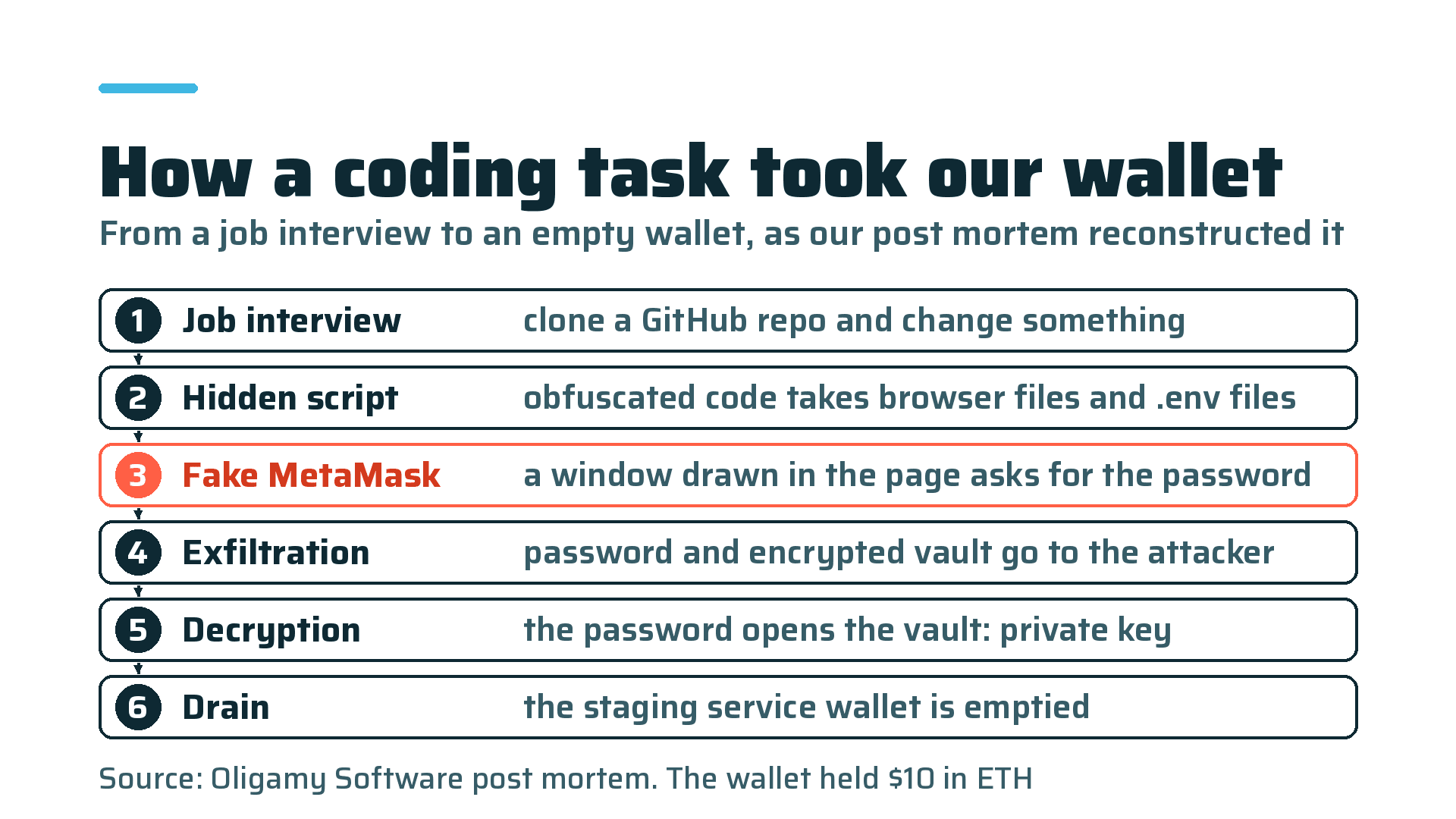
The assignment. During a recruitment interview, the developer was asked to clone a repository from GitHub and make a change in it to show their skills. Working on an existing codebase is a normal part of technical hiring.
The hidden script. The repository contained an obfuscated script. Our analysis after the incident showed that it collected files from the browser profile and .env files and sent them to a server controlled by the attacker.
The fake MetaMask window. Once the app was running, it showed a window inside the web page that looked like the MetaMask password screen. The developer typed the wallet password into it, as if logging in, and the password went to a server controlled by the attacker.
The decryption. Among the browser files was the MetaMask vault, the file in which the extension keeps its keys, encrypted with exactly that password. With the password and the file in hand, decrypting it was easy.
The drain. The vault gave the attacker a private key, and they emptied the account. It was a developer account that a background service used to write data to a blockchain in our staging environment.
After the drain
The wallet held $10 in ETH, and all of it was gone. The staging app stopped working, and we had to set up a new wallet for the service that uploads data to the blockchain in staging.
The script also took .env files, and any key in a stolen .env file has to be treated as known to the attacker.
Why a password and one file are enough
MetaMask keeps the secret recovery phrase in an encrypted vault inside the browser profile. In Chrome it sits in Local Extension Settings/nkbihfbeogaeaoehlefnkodbefgpgknn, the folder that MetaMask itself points users to when they need to recover a phrase (MetaMask). Our reading of the source code: in extension version 13.56.0, released November 6, 2026, the vault key comes from the password through PBKDF2 with SHA-256 and 600,000 iterations, and the vault is encrypted with AES-GCM (MetaMask core, browser-passworder).
Those iterations slow down anyone who tries to guess the password for a stolen vault. They do nothing for someone who already has the password. The same MetaMask guide describes decrypting a vault file with its Vault Decryptor tool: "This part is easy, so long as you know your password."
Stealers from the Contagious Interview campaign look for exactly that folder. ESET found that the BeaverTail malware checks for the MetaMask extension ID and that "any .ldb and .log files from the extensions' directories are collected and exfiltrated" (ESET). In July 2026, Elastic described a variant that uploads saved credentials, autofill data and "cryptocurrency wallet extension databases" from every browser profile it finds (Elastic).
The fake window supplied the missing half. MetaMask notes that its extension pops up when you sign a transaction and warns that "some scams take advantage of this by creating similar pop-up windows" and that "MetaMask will never pop up without you initiating a transaction" (MetaMask). A web page can draw anything inside its own area, including a convincing copy of the MetaMask password prompt.
The same lure, documented since 2022
- April 2022. The FBI, CISA and the US Treasury warned that messages from North Korean state sponsored actors "often mimic a recruitment effort and offer high-paying jobs" to get victims to download trojanized crypto apps, which the US government calls TraderTraitor (CISA).
- July 2023. GitHub reported "a low-volume social engineering campaign that targets the personal accounts of employees of technology firms, using a combination of repository invitations and malicious npm package dependencies" (GitHub).
- November 2023. Palo Alto Networks Unit 42 named the hiring variant Contagious Interview: attackers "pose as employers" to get software developers to install malware "through the interview process" (Unit 42).
- September 2024. The FBI listed requests to run a "pre-employment test" that involves "executing non-standard or unknown Node.js packages, PyPI packages, scripts, or GitHub repositories" as a sign of these attacks (FBI).
- February and March 2026. Microsoft described repositories presented as a "recruiting-themed technical assessment" that start code from
.vscode/tasks.jsonwhen the folder opens, and a loader that sends the wholeprocess.envto the attacker on startup (Microsoft, February 24, Microsoft, March 11). - September 18, 2026. A joint alert from the Japanese National Police Agency and National Cybersecurity Office, the FBI, DC3, the Australian ACSC, BND and BfV reported at least 30,000 infected devices in more than 100 countries, over 7,000 wallets and 1.7 billion yen ($10.71 million) in crypto moved to North Korea (joint alert, PDF).
- November 2026. Socket counted 1,648 unique malicious packages linked to the campaign, with the last activity on November 6 (Socket, read November 9).
We do not know who was behind our incident, and we are not attributing it to anyone. Our reading is that it follows the pattern these reports describe: a recruiter, a repository to run, and a stealer that goes after browser wallets and .env files.
Four rules from our post mortem
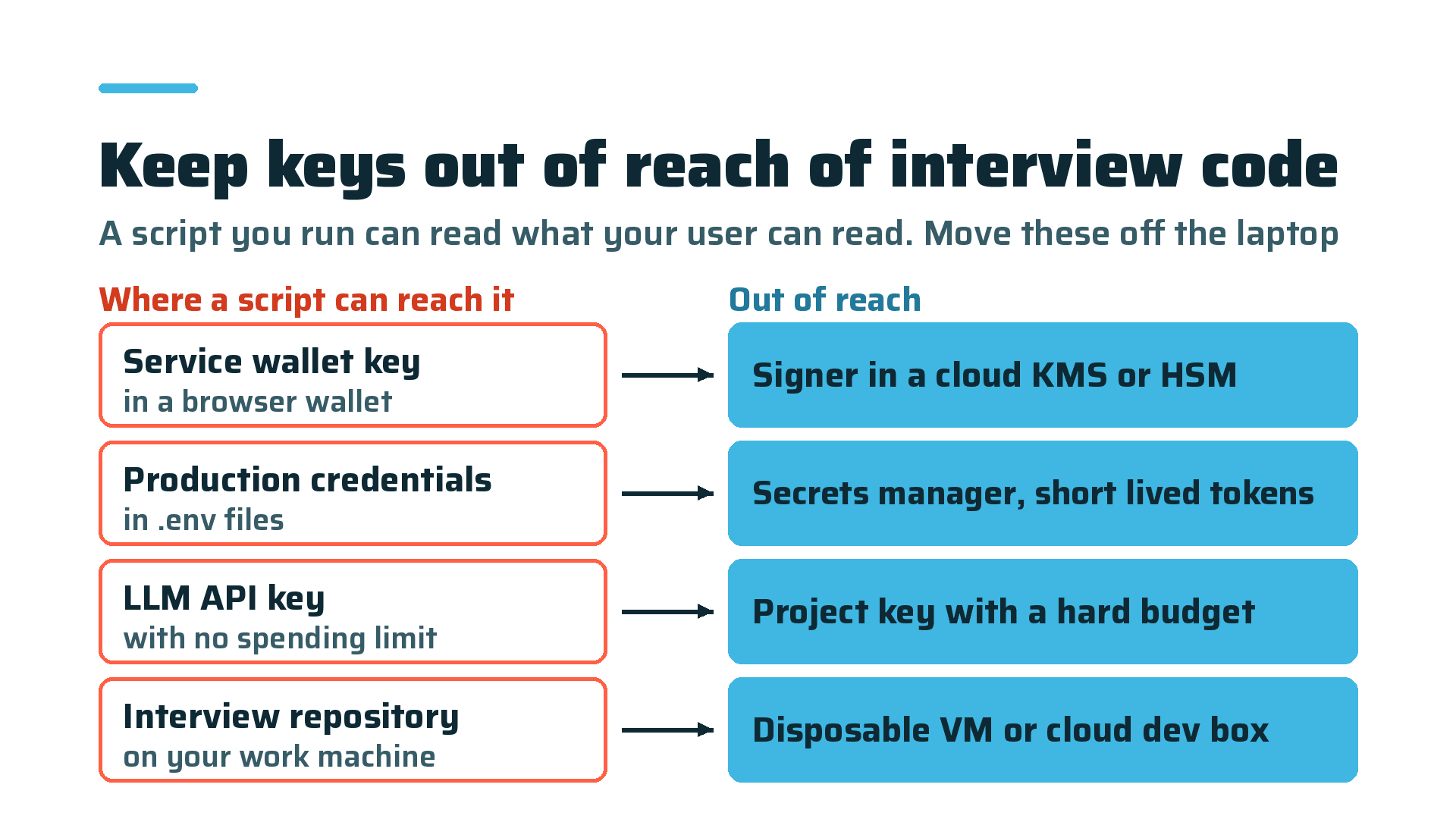
1. Treat hiring conversations as part of your attack surface. According to the joint alert, the attackers "often impersonate legitimate Artificial Intelligence (AI), cryptocurrency, or Non-Fungible Token (NFT) companies", the same fields our developers work in. Code from an interview should not run on a laptop that holds company keys.
2. Do not run code someone sends you, even from GitHub. A link to a public code host says nothing about what the code does. The FBI advice is direct: "If a pre-employment test requires code execution, insist on using a virtual machine on a non-company connected device, or on a device provided by the tester." Before anything runs, read the parts that execute without being called: install scripts in package.json, binding.gyp and editor tasks.
VS Code runs a task marked "runOn": "folderOpen" "when the containing folder is opened", although "automatic tasks never run in an untrusted workspace" (VS Code). Answer "No" to the trust prompt for any interview repository, which keeps it in Restricted Mode, where VS Code disables "AI agents, terminal, tasks, debugging, workspace settings, and extensions" (VS Code). The script below does a first pass without executing anything.
#!/usr/bin/env bash
# Read only first pass over a repository someone asked you to run. It changes nothing.
# A clean result does not make the code safe: it only catches the obvious tricks.
# Usage: bash look-before-run.sh path/to/repo
R="${1:?usage: look-before-run.sh path/to/repo}"
X=(--exclude-dir=node_modules --exclude-dir=.git)

echo "== 1. Code that runs on npm install"
find "$R" -name package.json -not -path '*/node_modules/*' \
  -exec grep -HnE '"(preinstall|install|postinstall|prepare)"[[:space:]]*:' {} +
find "$R" -name binding.gyp -not -path '*/node_modules/*'

echo "== 2. Editor tasks that start when you open the folder"
grep -rnE "${X[@]}" --include=tasks.json --include='*.code-workspace' '"runOn"[[:space:]]*:[[:space:]]*"folderOpen"' "$R"

echo "== 3. Very long lines (obfuscated or minified code; minified builds in dist/ are normal)"
find "$R" -type f \( -name '*.js' -o -name '*.cjs' -o -name '*.mjs' -o -name '*.jsx' -o -name '*.ts' -o -name '*.tsx' -o -name '*.py' \) \
  -not -path '*/node_modules/*' -not -path '*/.git/*' \
  -exec awk 'length($0) > 1000 { print FILENAME ": line " FNR ", " length($0) " characters"; nextfile }' {} +

echo "== 4. Code that decodes or runs other code"
grep -rnoE "${X[@]}" --include='*.js' --include='*.cjs' --include='*.mjs' --include='*.jsx' --include='*.ts' --include='*.tsx' \
  'eval\(|new Function ?\(|child_process|atob\(|fromCharCode' "$R" | head -20

echo "== 5. Browser and wallet paths that a web app has no reason to know"
grep -rnoiE "${X[@]}" 'Local Extension Settings|nkbihfbeogaeaoehlefnkodbefgpgknn|Login Data|Application Support/Google/Chrome|AppData[/\\]+(Local|Roaming)' "$R" | head -20

echo "== 6. Hard coded IP addresses"
grep -rnoE "${X[@]}" 'https?://[0-9]{1,3}(\.[0-9]{1,3}){3}(:[0-9]+)?' "$R" | grep -vE '://(127\.0\.0\.1|0\.0\.0\.0)' | head -20
Reading has limits, and so do install time protections. npm documents that ignore-scripts still lets npm start, npm test and npm run "run their intended script" (npm), and in one path from the February Microsoft report the code starts when the developer runs the app, for example with npm run dev. If the task needs the app running, run it in a disposable virtual machine with no browser profile, no wallet, no SSH keys and no .env files from your real work. In March, Microsoft recommended the same: "a non-persistent virtual machine" for coding tests and take home assignments (Microsoft).
A GitHub Codespace also runs on "its own newly-built virtual machine", but "Codespaces are allowed to make outbound connections to the internet" (GitHub Docs). A local dev container is weaker for this purpose, because VS Code reuses your Git credentials inside it and forwards your SSH agent if one is running (VS Code).
3. Keep production keys off laptops. A key that a service uses to sign transactions does not belong in a personal browser wallet, on any environment. Cloud key management services can hold secp256k1 keys, the curve used by Ethereum: AWS KMS offers ECC_SECG_P256K1, "commonly used for cryptocurrencies" (AWS), and Google Cloud KMS offers EC_SIGN_SECP256K1_SHA256 on HSM protection levels (Google Cloud). The service then gets permission to request signatures instead of a key file.
The same applies to deploy and cloud credentials. At Binance, according to its report, the attacker found that one engineer "had a container deployment permission token on his computer", and used it later in the attack. The FBI goes further for wallets: "Do not store information about cryptocurrency wallets ... on Internet-connected devices."
4. Never keep an LLM API key on a laptop without a spending limit. A stolen LLM key turns into charges on your account, and .env files are what these stealers collect. Anthropic lets you set spend limits per workspace, and once usage reaches the limit, "requests return HTTP 400". You cannot set one on the default workspace, so keys for local development belong in a separate workspace with a low limit (Anthropic).
OpenAI is explicit: "Spend alerts do not enforce a cap." A project stops only after you turn on "Enforce a hard limit", and even then, in the words of the documentation, "enforcement is not instantaneous" (OpenAI). Check both settings before a key lands in any .env file.
Red flags in a technical interview
These signs come from the reports above and from our own case. One of them alone proves nothing, and two together are a reason to slow down.
- The company works in crypto, AI or NFTs and found you on a job platform. That is the profile the joint alert and Microsoft describe, and how Binance says its engineer was approached.
- The conversation moves to a chat app. In the Binance case, the second interview took place "in a popular social chat app".
- The task starts from someone else's project that you have to run. ESET describes "adding a feature to an existing project" from a private repository, and our developer was asked to change something in an existing repository.
- The code has parts you cannot read. The joint alert says to "verify no obfuscated or unreadable sections are present before execution".
- A video call fails and someone gives you a command to paste. Sekoia documented fake interview sites that show a camera error with "commands to copy, paste, and run" (Sekoia).
- A wallet asks for your password inside the app. In our case this window is where the password was handed over.
If you already ran it. The joint alert says to assume that wallet data "may already have been exfiltrated" even after the malware is removed. Create a new wallet on a separate device and move all assets to it, because a new password does not help when the attacker holds the vault. From a clean device, rotate every key from the .env files on that machine and change the passwords saved in its browser. The alert also recommends a full reset of the operating system.
What we do not know. We know what the script collected and what left the wallet. We cannot see what the attacker did with the rest of the copied files, and anything in that browser profile or in those .env files should be treated as exposed. We also cannot say who ran the operation.
If your product signs transactions from a backend, our blockchain development team designs signing services that keep keys in a cloud KMS or HSM. For code that runs during npm install, see our post on npm worms and the settings that contain them.
Frequently Asked Questions
Security review for teams that sign onchain
We check where your service wallet keys, deploy tokens and API keys live, and which of them a script started by one developer could reach.
Book a free technical validationSources
Facts about our incident come from our internal post mortem. Everything else is attributed in the text.
- Binance, 29 October Binance Security Incident: Initial Findings and Response Update, November 3, 2026
- NPA, NCO, FBI, DC3, ASD ACSC, BND and BfV, joint alert on WaterPlum, commonly referred to as Contagious Interview, September 18, 2026
- FBI, North Korea aggressively targeting crypto industry with well disguised social engineering attacks, September 3, 2024
- CISA, FBI and US Treasury, TraderTraitor, AA22-108A, April 18, 2022
- GitHub, Security alert: social engineering campaign targets technology industry employees, July 18, 2023
- Microsoft, Developer targeting campaign using malicious Next.js repositories (February 24, 2026) and Contagious Interview (March 11, 2026)
- Palo Alto Networks Unit 42, Hacking Employers and Seeking Employment: Two Job-Related Campaigns Bear Hallmarks of North Korean Threat Actors, November 21, 2023
- ESET, DeceptiveDevelopment targets freelance developers, February 20, 2025
- Elastic Security Labs, New North Korean campaign uses fake coding interviews to steal developer credentials, July 18, 2026
- Sekoia, Lazarus ClickFake Interview Campaign: ClickFix Malware, March 31, 2025
- Socket, Contagious Interview campaign page, read November 9, 2026
- MetaMask Help Center, How to recover your Secret Recovery Phrase and How to verify the real MetaMask wallet; source code of browser-passworder 6.0.0 and @metamask/wallet 20.0.0
- VS Code, Tasks, Workspace Trust, Sharing Git credentials with your container
- GitHub Docs, Security in GitHub Codespaces; npm, config
- Anthropic, Rate limits; OpenAI, Spend limits
- AWS, Key spec reference; Google Cloud, Key purposes and algorithms